Picross e, then Picross e2. Picross e3, e4, e5 and – as you’d expect, e6. You’d be forgiven for thinking that developers Jupiter were stuck in a bit of a rut, but as a massive fan of the series of Japanese puzzles, you must understand that the inevitable e7 was high on my shopping list. Surprise! There’s no e7, as Jupiter have gone Pokémon, with Pokémon Picross.
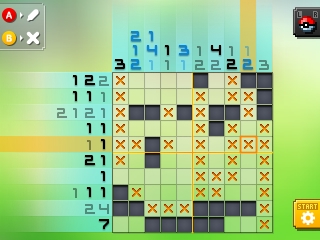
Can you tell what is is yit?
If you squint, it’s more of the same. Instead of the usual pixel art representations of toilets and anchors and chickens, they’re all Pokémon. You probably guessed that was coming. In itself, it’s not a bad thing as any more picross – to a picross aficionado – is always welcome. It doesn’t matter what the hidden picture actually is anyway, as it’s all about the journey. Snorlax or snooker table, who cares, right? Right. Especially since the game is free!
Only Nintendo stuffed the game full of IAPs, didn’t they. Artificial paywalls to progress, as already seen in other 3DS Pokémon games – Pokémon Rumble World and Pokémon Shuffle. In those games the in-app purchases merely served as ways of speeding up the game progress, and Shuffle at least was perfectly completable without ever busting out your eShop wallet. I was expecting the same here, and since I’d play only a handful of puzzles a day in the e-series games thought this would see me through. Sadly, this is not the case.
Pokémon Picross: The first one is always free
Liberally plying you early on with Picrites (the in-game currency) to show you how you can unlock more areas, puzzles and Pokémon slots, the flow soon slows to a trickle with each completed puzzle only rewarding you with 6 or 7. That’s a best-case scenario as in order to get the maximum number of Picrites from a puzzle you need to fulfill some requirements, such as use certain Pokémon. In turn, this leads to repeating the puzzles as you can’t always max them out on your first attempt. This might be fine in other types of games, but you really don’t want to be redoing picross puzzles. You wouldn’t redo a crossword, would you, and It’s the same here. To open up the next area of Pokémon, with each area home to around six or so beasties, you need a large number of Picrites. 70 or 80 for the earlier areas, and as you only get 6 or 7 per puzzle some quick maths shows there aren’t enough puzzles in each area to stump up the Picrites to unlock the next, and that’s before you start spending them on other in-game stuff. The solution: Pony up real actual money. Cunning Nintendo. A few more Picrites are handed out in the daily challenge puzzles, which are boring, randomly generated and pictureless, and you get a handful more for achievements, but it’s still not enough to get through without tedious repetition.

It’s a shame they missed a trick and didn’t make the map itself a giant picross puzzle.
The other changes to the standard e formula are less intrusive, with the puzzles themselves following the same style, right down to the same font, used in the older titles. Whereas before you had the option to automatically display one row and one column before you started, and had blue “number hinting” to help with determining if you had available moves, these features now manifest in the form of Pokémon moves. Collect the creatures by solving their puzzle, then set up to six of them (providing you stump up the precious Picrites necessary to open all the slots) at a time to be used during other puzzles. These moves can activate those traditional abilities as well as new ones, such as a “scattershot reveal” or a correction tool. Some have cooldowns meaning they can only be used once in a period of (real) time, and some only apply to certain puzzles sizes, so catching them all is once again on the cards. It’s actually quite good fun and a welcome twist. In fact, as you work through a single area you realise how much you’re enjoying it then BAM! You run out of energy.
Did I not say? I’m sorry. That’s right. Energy. Every tile you place in each puzzle drains one unit of energy, and you only have a finite amount. Before you even reach the paywall at the end of an area, you hit another paywall because you can’t play any more as your energy is depleted. You can wait until the next day for it to be replenished, of course, or you can splash out on some more of those naughty Picrites and bypass the forced pause in play. A double-whammy of painful penny pinching.
Pay ALL the money
One thing you can’t money your way out of is the control system. Although you’d expect that filling in picross puzzles with a stylus makes more sense than a d-pad and button combo, to someone who cut their picross teeth on Mario’s Super Picross on the SNES the stylus is An Unnecessary Item. In the e games, you can choose your input mechanism of choice, and in Pokémon Picross it would appear you have the same option. It’s a façade: You can only use buttons to solve the puzzles, and most of the rest of the UI requires a plastic stick or finger to operate. There’s no reason for it, it’s annoying, and it’s a thoroughly confusing design decision. It sounds a small complaint, but after you’ve pressed B for the n-teenth and “Use the stylus!” has flashed up yet again, it grates.
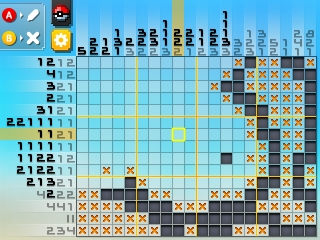
Like previous games, puzzles vary in size.
As a free game it could get a lot of slack for things like this, but the game isn’t free. To get fun out of it you’ve no real choice but to buy some Picrites. When you look into the Picrite shop, you can see that if you spend enough money, they become free from then on, effectively buying the game outright. If you want to get onboard with this way of paying for your Picross game, it’ll set you back around £30. The older e titles are nearer a fiver. Just sticking Pokémon in it does not mean they’re worth an extra £25, especially since you can almost buy all six Picross e games for the cost of Pokémon Picross. And, frankly, that’s where your money should go instead.
Robbin bleeders!