If you told an infant-sized Qazimod that he’d go from playing Contra – sorry, Gryzor – on Commodore 64 to having fully-fledged virtual reality in the house, he’d think that you were a liar or a magician. Here we are though, with a new headset ushering in an age of virtual reality for PS4 owners. My introduction to Playstation VR began around midday on October 13th, and the first thing that struck me was just how much stuff there was in the box. You have a headset you put on your head, a box that connects the headset’s two cables to a breakout box, HDMI cables that go from the PS4 to the breakout box and from the breakout box to the TV, a power supply unit connected with two more cables (to the mains plug and breakout box respectively), a USB cable connecting the breakout box to the PS4…and after the PSVR is connected you still have to plug the PlayStation Camera and DualShock 4 in somewhere.
My introduction to Playstation VR – the headset and cables 
Before my introduction to PlayStation VR, I was worried that my play space would be too small and that the distance from the PlayStation Camera and the headset would be too short for games to work effectively. However, the peripheral distance isn’t why you’ll need floor space; the mass of cables and boxes is a greater concern. At least when you have the headset on you don’t need to see the cables, but trying to tidy things away after each session could take some time to perfect. Additionally, the headset itself is comfortable and not too heavy. Beyond the visor, rubbery flaps shield your peripheral vision from the outside world, and padding on the top and at the back ensure that it feels good to wear. The plastic around the side looks thin and is a little flexible, but it’s not like the plastic is going to break easily. The mess of cables is a bit worrying but it’s not something you’ll ever see that often.
My introduction to Playstation VR – setting up 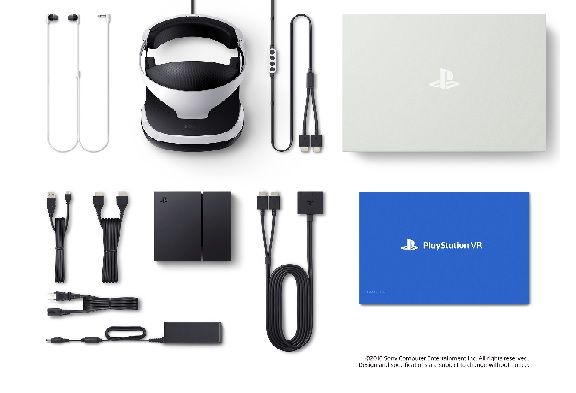
The included Quick Start guide has big clear diagrams and simple instructions so that you can get things up and running in no time, and once it’s all ready and calibrated you have an interesting virtual view of the PS4 dashboard. Looking at the tweets I was making during the release day hype, there was about an hour between receiving the package and getting my first look at the virtual dashboard, so the setup isn’t too painful (that said, making floor space beforehand helped.) Some important things to note in order to get comfortable – the button on the back of the headband helps you find the right fit for your head. Also, if you want to readjust your head and then refocus the view, you can hold the Options button on the joypad and this will be done. (I’m ashamed to admit that it took me a moment to get used to that, and I spent a while trying to navigate menus with my head permanently looking to one side.)
My introduction to Playstation VR – viewing and motion

The view inside the headset has a slightly fuzzy resolution but it does the job for what I’ve played. I had never tried modern VR – Oculus, Vive, Gear – before, and the best way I can think of to describe the VR view of the static, flat dashboard is that it was a little like seeing slides in a Viewmaster, with the image suspended in black space. Meanwhile, games such as Tumble VR amply demonstrate the 3D depth effect; as you bring blocks closer to you it feels less like looking at a screen and more like peering into a small room. It’s an impressive effect, and the simple concept of Tumble – use Move to pick up blocks and build a tower – make it a gentle introduction to PSVR.
Another thing worth noting is that I’m new to PSVR and VR generally – I’ve never used Rift, Vive, Gear et al, and I don’t remember trying that many older attempts at VR either. My introduction to PlayStation VR was one where I had no previous VR experience – a big gamble, but so far I haven’t really experienced motion sickness or other dizziness; the most discomfort came from me not centring the view properly or adjusting the headband enough. Admittedly, I’ve only tried a couple of games, so my experience may change with other titles, but my eyes and brain adjusted quickly and easily.
My introduction to Playstation VR – the games

Of those two games, Tumble VR was a perfect introduction to virtual reality – a traditional puzzle experience that takes place in a virtual space. Using Move to pick up and stack blocks isn’t something that really utilises VR in a special way, but it demonstrates how immersive the experience is. If you’re new to VR and want something simple to get started on, or if you ever wanted to feel like an observer in a pipe-filled chamber manipulating a floating controller, it’s worth a look.
Next up, I looked at Rez Infinite. For all intents and purposes it’s Rez with VR-based freelook and aiming, although direct DS4 control can be used as well. Like Tumble, it succeeds in dropping you into some abstract, otherworldly environment, and even though it’s one you’ve been through before on PS2, Dreamcast and 360, Rez Infinite instantly feels more immersive. For a game that is credited for its wireframe looks and energetic sounds, a PSVR headset and some good headphones make you feel like you’re playing Rez how Mizuguchi would have always wanted if the tech was available.
My introduction to Playstation VR – virtual reality for everyone?

If this hardware represents virtual reality for the mass market, my introduction to Playstation VR made a strong first impression. I had previously been criticised in online communities for buying into massmarket hype and ignoring other PSVR reviewers who had reported feelings of nausea, but the results on launch day have been pleasant and exciting. It’s too early to say if the technology will take off – certainly the announcement of PS4 Pro will help to facilitate development of further VR titles – but right now it succeeds in delivering VR experiences to those who can’t stretch to the requirements of Oculus or Vive.
PlayStation VR is available now for £349.99. All games require Playstation Camera and some may need PS3 Move Controllers.
Leave a Reply